This is an English translation of the review of Biliardo 2 originally published in Italian by Incubus in 2002. Read the original review in Italian.
I know this video game is hugely well known; most of you, like me, will have had it installed on your PC for a while now. But last month (on 19 MARCH 2002, to be exact) the new, eagerly awaited version came out, with some new features that I’ll show you shortly.
For those who don’t know it yet, BILIARDO is a video game created by MARCO CHIESI that has been circulating, and periodically developed, for several years. Right from the start, it has won over anyone who has played real billiards, whether at amateur or professional level.
The main feature that sets BILIARDO 2.2 apart from other billiards video games is that it offers the classic Italian games, that is, the ones played in professional tournaments and that everyone in turn then plays in bars and in halls set up specially for billiards.
In order of appearance in the game menu, we have these specialities:
5 PINS
GORIZIANA
GORIZIANA (x2)
BOWLS
CAROM
1-CUSHION CAROM
3-CUSHION CAROM
3 BALLS
In practice, the Italian games most played on the green table.
When you start a match at any of these games, you’ll immediately notice the many movement options at your disposal, including: positioning the cue, complete with any inclination you like; programming the spin to put on the shot; a sight for hitting the chosen ball at a precise point; adjusting the power of the shot; and even changing the temperature of the table. So you can decide whether to play a full, powerful shot or a spin shot of any kind, even a parabolic one. You can play any kind of shot that can be played on a real billiard table. And if a shot turns out particularly well, admire it again with the replay function. There are also lots of other options, such as turning on guide lines for the less skilled, choosing the type of table to use, saving the match and reloading it later, analysing the statistics in nice graphics or, if you like, simply playing in practice mode to get some training.
To complete the job, there’s a nice manual in Italian that shows you how to use all the various commands, and another with the rules of every game included in the software.
As for the graphics, I dabble in making video games myself and I can assure you that everything has been worked out in detail; you can see the hard work put in by MARCO CHIESI and FRANCESCO SCHIUMERINI: the balls glide across the cloth smooth as oil and in an absolutely natural way, and the collisions between objects are precise and calibrated, backed up by sound effects that sound real. Still on the subject of sound effects, the audience will also take part in your matches, applauding you vigorously at every great shot and booing you mercilessly when you make a fool of yourself. The gameplay is also practically as simple as can be: everything is done with just the left mouse button or, if you prefer, the space bar on the keyboard. As for the various secondary functions, they are all done with the keyboard, but you learn them quickly from the manual.
What else can I tell you, except that BILIARDO 2.2 is a video game packed into a compressed file of just 838 KB, totally free and downloadable directly from its creator’s site at this address: www.chiesi.net
For those who don’t know it yet, here are some reduced-size screenshots of BILIARDO 2.2 (because, as you can see, the software also lets you save screenshots in BMP format), although this time the colours came out much more washed out than they look during play:
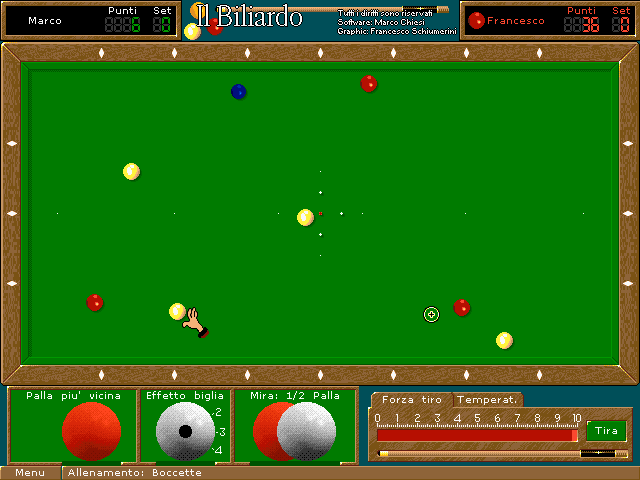 In this picture we have a game of BOWLS. On the table, besides the balls, there is also the sight (a transparent ball with a cross in the centre), which you position according to your intentions. Below the table, on the left, we are shown the ball to be thrown that is nearest to ours, the type of spin to apply and the sight. On the right, the power control, the temperature control and the button to play the shot. The sight can also be used to hit a precise point on the cushion: just place the mouse cursor on the edge of the table at the point you want and left-click.
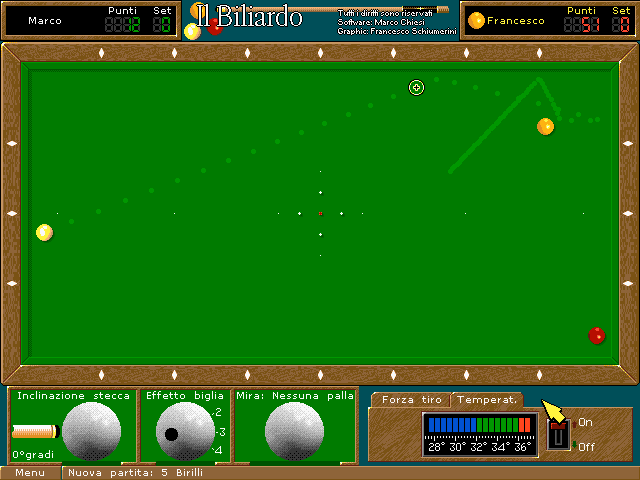 Here we have an example of a 5 PINS game with the lines for beginners. Below the billiard table, on the left, we are given the option of tilting the cue (34° in this case), putting a certain ideal spin on the ball and aiming at the ball to be hit by selecting the exact point. On the right, the shot power control, the temperature control and the button to play the shot.
 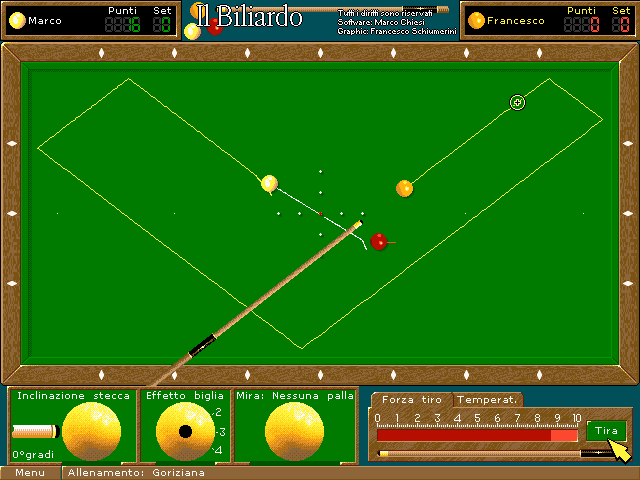 Among the many options, here is the one for using a typical pub billiard table, complete with stains on the cloth and cigarettes on the edge. This is the opening screen of the 3 BALLS game.
 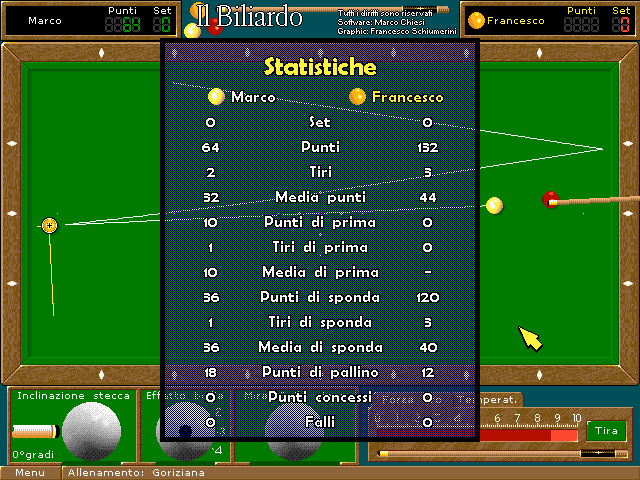 Finally, here is the STATISTICS screen, which you can view at any point during the match. Obviously everything is at zero because I opened it just to give an example on this page, but as you go on with the match, the values will rise according to your shots.
The new version of this game has been available for just a few days, with lots of new features, and it’s totally free.
[note: the images are not the same as in the original review]
by INCUBUS